A Simple CLI game in Go
Mastermind Game
Recently I was introduced to a game called Mastermind. It immediately clicked with my developer brain: you’re basically doing guided search through a big space of possibilities, and every guess should incorporate the feedback from the previous guess.
How to play the game?
The rules are simple:
- There are 4 slots.
- Each slot is one of these colors: red, green, blue, yellow, purple, orange, pink, brown, gray, black, white.
- The “code” (the answer) is a sequence of 4 colors.
- On each turn, you guess a sequence of 4 colors and get feedback:
- Correct position: how many colors are correct and in the correct slot.
- Wrong position: how many colors exist in the code but are placed in the wrong slot.
For example, the answer is red, green, blue, yellow, and the guess is red, green, blue, purple. The feedback will be 3, 0, because the first three slots match exactly, and purple doesn’t appear in the answer at all.
TUI Game
As a developer, I wanted a terminal version of the game, and I’m still a big fan of Go. After a bit of research, I landed on this toolkit:
- Bubbletea: a framework for rendering the TUI (like react for TUI)
- Lipgloss: a library for styling the TUI (like css for TUI)
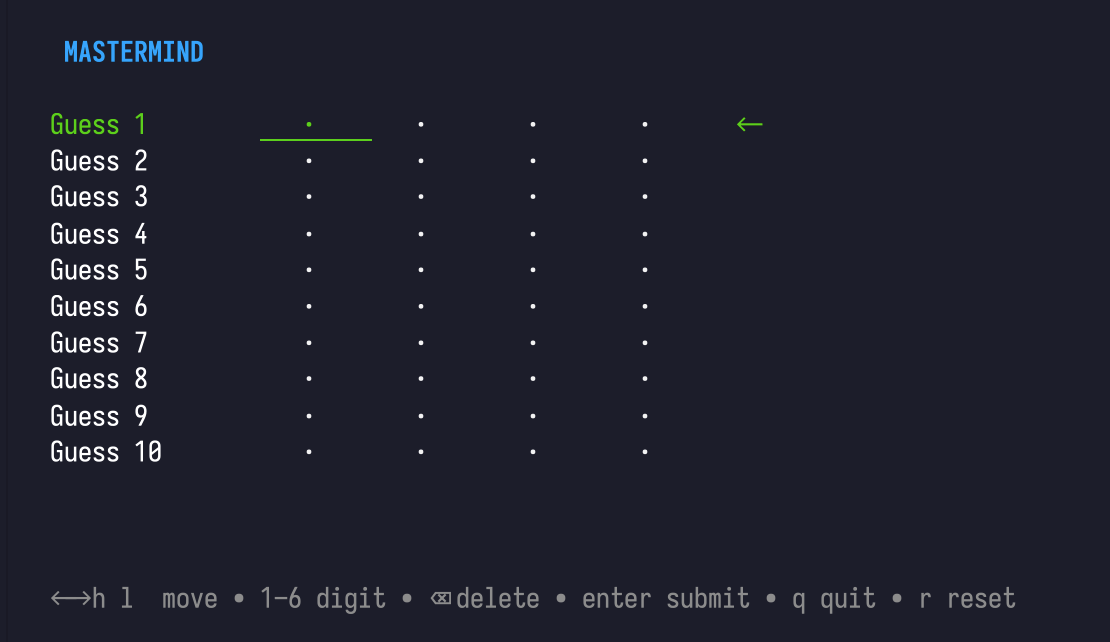
Render the Game
mastermindtuishould implement the interface of tea.Model
package main

import (
	"fmt"
	"gocli/internal/ui/tui/mastermindtui"
	"os"

	tea "github.com/charmbracelet/bubbletea"
)

func main() {
	p := tea.NewProgram(mastermindtui.InitialModel())
	if _, err := p.Run(); err != nil {
		fmt.Printf("Alas, there's been an error: %v", err)
		os.Exit(1)
	}
}- The model interface is simple. At minimum you implement
Init(),Update(), andView().
func (m MastermindModel) Init() tea.Cmd {
	return nil
}

func (m MastermindModel) View() string {
	//...
}

func (m MastermindModel) Update(msg tea.Msg) (tea.Model, tea.Cmd) {
	switch msg := msg.(type) {
	case tea.KeyMsg:
		switch msg.String() {
		case "ctrl+c", "q", "esc":
			return m, tea.Quit

		case "left", "h":
			m.Left(true)

		case "right", "l":
			m.Right(true)

    // ...

		case "r":
			m.game.Reset()

		case "enter", " ":
			// ....
		}
	}

	return m, nil
}View()returns the current UI as a string. I uselipglossfor styling and layout.
As a Lipgloss newbie, these two helpers were the ones I leaned on most:
lipgloss.JoinHorizontal()lipgloss.JoinVertical()
My mental model is: the UI is one big <div>...</div>. JoinHorizontal is like <div className="flex flex-row">...</div>, and JoinVertical is like <div className="flex flex-col">...</div>.
Update()handles inputs and updates state. Each keypress runsUpdate(), then Bubble Tea callsView()again to re-render—very similar to a React-style loop (event → state change → render).
Links: